Almost every build-up you have ever heard uses a filter, and almost every first attempt at one sounds the same. The cutoff starts opening on bar one and climbs at a steady rate, so by the time the drop arrives the track is already as bright as it will ever get. The drop has nothing new to give, and it feels small. The plugin isn’t the problem. The problem is not knowing what the filter is doing to the sound, and when.
A filter has four controls that matter. Each one below comes with a diagram and something to try in the filter embedded after section 1.
1. A filter only removes
Every sound is a stack of frequencies: a fundamental and harmonics above it. A filter does one thing, which is turn some of them down. Everything else people say a filter does, like warmth, distance, tension or the underwater effect, follows from which frequencies it removes.
The type decides which side goes. A low-pass keeps what is below the cutoff and removes what is above it, so the sound gets darker and seems further away. A high-pass does the opposite: it removes the low end, so the sound gets thinner and lighter. A band-pass keeps only a band around the cutoff, the telephone or radio sound. A notch removes a narrow band and leaves the rest. It is subtle when still and mostly useful when it moves.
In practice, low-pass covers most musical moves and high-pass covers most cleaning jobs, like taking the rumble out of pads, reverbs and hi-hats so the kick and bass have the low end to themselves. The EQ guide covers that cleaning side in detail.
2. Cutoff: where the filter starts working
The cutoff is the frequency, in hertz, where the filter starts to act. Two things about it matter more than the number itself.
First, the ear hears frequency in ratios, not in steps. Going from 100 to 200 Hz is the same musical distance, one octave, as going from 5 to 10 kHz. That is why cutoff knobs are scaled logarithmically, and why the last part of a sweep, above about 5 kHz, sounds like a big change even though the knob barely moves.
Second, what the cutoff removes depends on the sound you feed it. A bass with all its energy below 200 Hz barely notices a low-pass at 2 kHz. A bright pad at the same setting loses all of its air. So there is no “right” cutoff value, only the right value for that sound.
In the tool, choose CHORD and LOW PASS, then bring the CUTOFF down until the chord is dull but still clearly there, somewhere around 300 to 500 Hz. That is a typical starting point for a build-up.
3. Resonance: the whistle at the edge
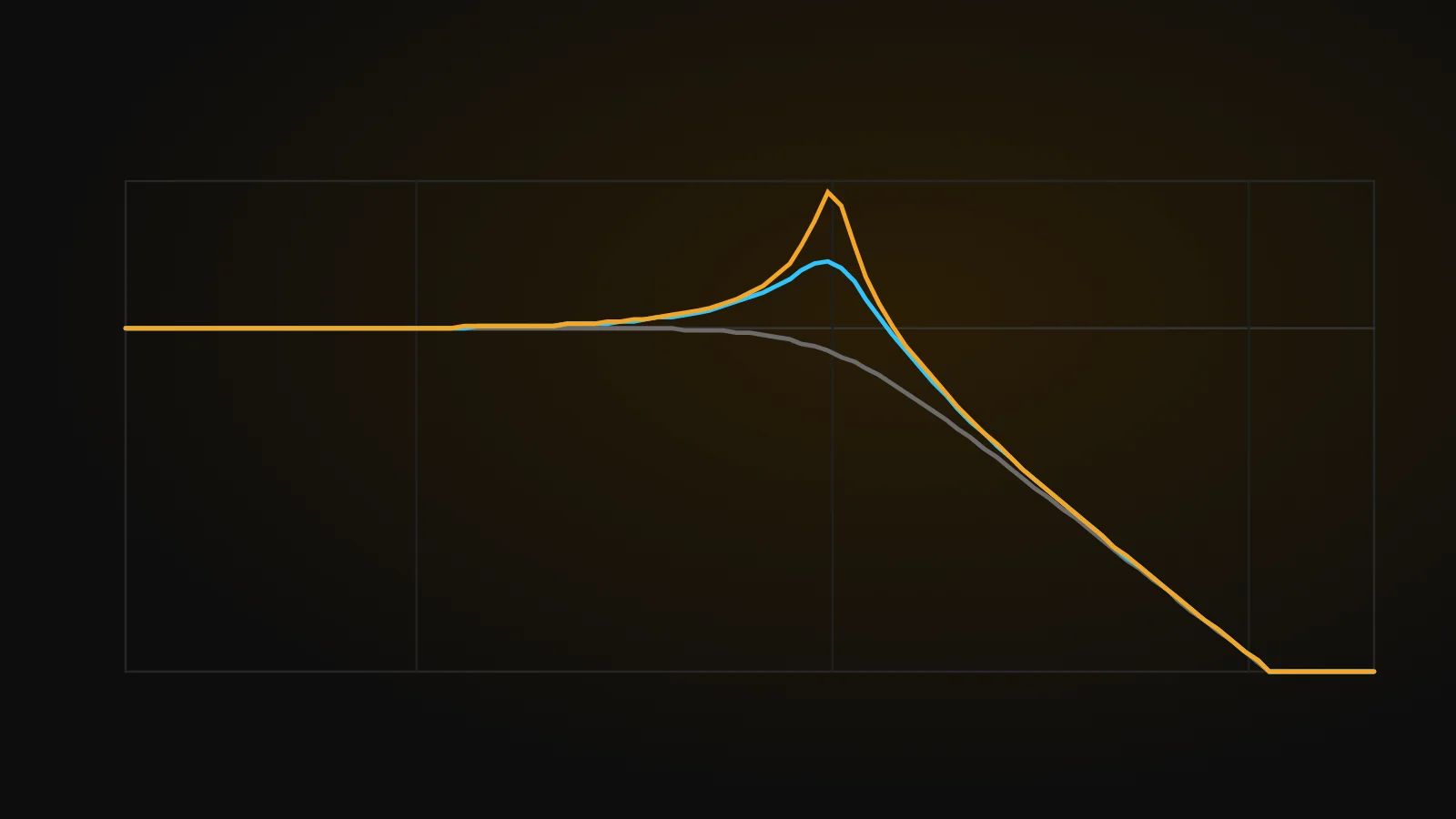
Resonance boosts a narrow band right at the cutoff. At low settings it adds a little presence. At high settings the boosted band starts to whistle, and when the cutoff moves you hear that whistle slide like a pitch. Push it further and many filters self-oscillate: they produce a sine tone at the cutoff even with nothing coming in.
This is the sound of acid: a resonant low-pass whose cutoff is pushed open by an envelope on every note. Two working rules follow from the diagram. The more resonance you use, the smaller the cutoff moves you need, because the peak makes every movement obvious. And be careful with high resonance on bass and kicks. The peak can add several dB at a single frequency and push the channel into clipping. Raise DRIVE in the tool with resonance high and you will hear how quickly it turns aggressive.
4. Slope: how hard it cuts
Past the cutoff, a filter doesn’t remove everything at once. It turns frequencies down gradually, and the slope says how fast, in dB per octave. The usual choices are 12 dB (a two-pole filter) and 24 dB (four-pole). In Ableton Live you can switch between them in Simpler, Sampler and Wavetable.
A 12 dB filter is gentle. It softens the top but keeps some air, which makes it the right tool for pushing a pad back without killing it. A 24 dB filter is darker and more obvious, the “club next door” sound, and it makes resonance stand out more. If a sweep sounds too subtle, check the slope before you reach for more resonance.
5. The sweep: when to open, not just how
A build-up sweep is a promise. The brightness you hold back is the energy the drop delivers. So the real question isn’t whether to open the filter, it’s when.
- opens from bar 1 at a steady rate
- closed until bar 5, curve at the end
- two stages with a pause
Three rules come out of that diagram. Keep the filter closed longer than feels comfortable and do most of the opening in the last two to four bars. Open it in a curve, not a straight line: in Live’s automation, hold Alt (Windows) or Option (Mac) and drag a segment to bend it. And try two stages with a short pause between them, which makes the final release feel bigger.
Put the filter on a group with the music, not on the kick, so the beat keeps its weight while everything else opens. Many producers also use the reverse move right before the drop: a high-pass on the music or the whole mix, rising over the last bar, switched off on the downbeat so the low end comes back all at once. These are working conventions, not laws. The point is always to save something for the drop.
6. Movement inside each note
Automation moves the filter across bars. An envelope or an LFO moves it inside a single note or beat, and that is where most of a synth’s character comes from.
A filter envelope with a fast attack and a short decay opens the filter at the start of every note and closes it straight away. That shape is a pluck. The ADSR article shows the same shape applied to volume; on the filter it shapes brightness instead. An LFO synced to 1/8 or 1/16 on the cutoff gives a rhythmic wobble. And Live’s Auto Filter can follow the level of a sidechain input, so a kick can dip the brightness of a pad instead of its volume, a softer cousin of sidechain compression.
What changes from genre to genre
These are habits you will hear in the music, not rules.
House: a low-pass on the chords or the whole loop, ridden by hand. Filter house built a whole style on that one gesture. Opening the filter over the first minute is also a cleaner way to bring a loop in than muting and unmuting it.
Techno: slow changes of cutoff and resonance on the rumble or a single stab, stretched over minutes. When a track uses two or three notes, the filter does the work a melody would do elsewhere. More in how to make techno.
Organic house: a gentle 12 dB low-pass on pads and textures to place them behind the groove, and band-pass on field recordings so they sit in a narrow slot instead of filling the spectrum.
Afro house: high-pass on percussion and vocal chops, so the kick and bass keep the low end, and band-pass on call-and-response elements so they read as a separate voice. The afro house drum patterns article shows where that space is needed.
In the filter above, choose CHORD and LOW PASS, set the cutoff around 400 Hz and resonance at 2. Open the cutoff to the top over eight seconds, as evenly as you can. Do it again, but keep it closed for six seconds and open it in the last two. Then raise resonance to around 8 and repeat. Finally switch to LOOP and HIGH PASS, and pull the cutoff up to about 400 Hz and back down in one movement: that is the pre-drop move. In Live, put Auto Filter on a group with your chords and pads, draw 8 bars of automation that copy the orange line in the diagram, and compare it with a straight line. Ten minutes is enough.
Four controls, one idea: a filter decides which frequencies the listener gets, and when. Hold brightness back until it means something. To see where the filter sits inside a synth, read how synthesizers work or play with it in the online synth. The electronic music production tutorials page shows what comes next on the path.
- Ableton Live 12 manual: Audio Effect Reference, Auto Filter
- Ableton Live 12 manual: Instrument Reference (filters in Simpler, Sampler and Wavetable)
- FabFilter Learn: Basics, filters
- Sound On Sound, Gordon Reid: Synth Secrets, Of Filters & Phase Relationships
- MusicRadar, Martin Delaney: 8 things you can do with Ableton Live’s updated Auto Filter
- Ableton Learning Synths (interactive)
Learn to produce electronic music.
Structured courses, interactive tools and real-world references. Built for producers who are just starting out.